
 XI本部、2025 Japan AWS Jr. Champions の佐藤悠です。
本記事ではAWSのAmazon Bedrock AgentCore(以下:AgentCore)を用いて、AI AgentをAWSにホストするところまでをやっていきます。
Agentを用いて自分専用のチャットアプリを作成したいと考えたのが、モチベーションです。
AgentCoreとは
Amazon Bedrock AgentCore は、効果的なエージェントを大規模かつ安全に構築、デプロイ、運用するためのエージェントプラットフォームです。
引用:https://aws.amazon.com/jp/bedrock/agentcore/
上記のようにAI Agent構築のためのプラットフォームになっており、変化の速いAIサービスに対応可能な素早いデプロイに強みがあると思っています。
デモ構成のAgentをローカルで立ち上げる
コード
エージェントの作成はStrands Agents というOSSのSDKを使用します。
数行のコードと直感的なアノテーションをもとにAgnetを実装できるので今回はこちらを採用し、検証をします。
早速、公式ドキュメントの例を参考にStrandsでツールの作成、Agentの定義をします。
from strands import Agent, tool
from strands_tools import calculator # Import the calculator tool
import argparse
import json
from bedrock_agentcore.runtime import BedrockAgentCoreApp
from strands.models import BedrockModel

app = BedrockAgentCoreApp()

# Create a custom tool
@tool
def weather():
    """ Get weather """ # Dummy implementation
    return "sunny"


model_id = "global.anthropic.claude-haiku-4-5-20251001-v1:0"
model = BedrockModel(
    model_id=model_id,
)
agent = Agent(
    model=model,
    tools=[calculator, weather],
    system_prompt="You're a helpful assistant. You can do simple math calculation, and tell the weather."
)

@app.entrypoint
def strands_agent_bedrock(payload):
    """
    Invoke the agent with a payload
    """
    user_input = payload.get("prompt")
    print("User input:", user_input)
    response = agent(user_input)
    return response.message['content'][0]['text']

if __name__ == "__main__":
    app.run()
引用:runtime_with_strands_and_bedrock_models.ipynb
このコードではstrands_toolsで既に構築済みのツール群を用い、計算ツールが定義されています。
また、カスタムツールも使用しています。
自作の関数を@toolデコレーターで使用可能なツールとして認識させられます。
この関数名をAgent()の初期化時に渡すことでツールの使用が可能になる仕組みです。
Agentがユーザーの入力を受け取り回答を生成する関数を、@app.entrypointデコレーターでハンドラーとして指定しています。
app = BedrockAgentCoreApp()でランタイムアプリケーションを初期化し、app.run()でローカルHTTPサーバーを起動してリクエストを受け付けられる状態にしています。
python weather.py 実行
  ↓
app.run() でサーバー起動
  ↓
HTTPリクエスト待ち受け
  ↓
POST /invocations にリクエスト
  ↓
@app.entrypoint の関数が実行
  ↓
レスポンス返却
環境構築
次にvenvを用いた環境を構築します。
#python version確認(※v3.10以上が必須です)
> python --version
Python 3.14.2
#環境分離
> python -m venv .venv
#仮想環境を有効にする
> source .venv/bin/activate
以下のrequiremets.txtを記述します。
strands-agents
strands-agents-tools
bedrock-agentcore-starter-toolkit
フォルダ構成は現時点で以下のようになっています。
workspace/
├──.venv/
├──weather.py
└──requirements.txt
workspaceで以下のコマンドを実行し、モジュールのインストールを実行します。
pip insatll -r requirements.txt
ローカルでの実行
次に以下のコマンドを実行し、サーバーの起動を実施します。
#ローカルでの起動
>python3 weather.py
#別ターミナルでのレスポンス確認
> curl -X POST http://localhost:8080/invocations   -H "Content-Type: application/json"   -d '{"prompt": "What is the weather?"}'
#レスポンス
"The weather is **sunny**! It looks like a beautiful day outside."
以上のようにしてレスポンスを確認することができました。
ここまでまとめ
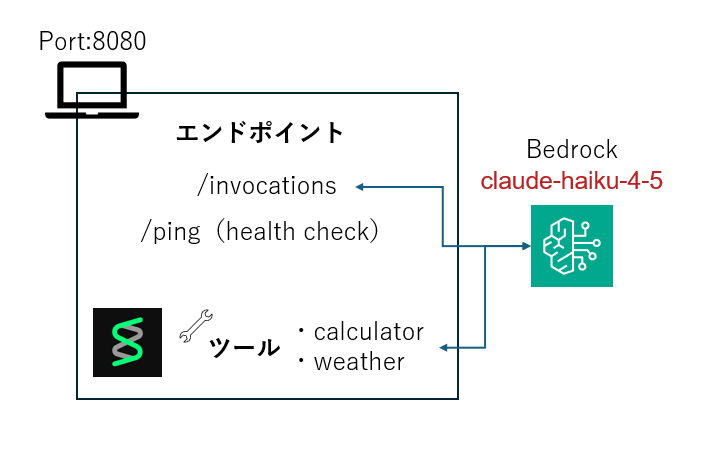
AgentCoreを用いてサーバーを起動すると以下のような構成でAgentをローカルで起動することができます。
- HTTPを8080でリッスンする
- /invocationエンドポイントが作成される
- /pingのエンドポイントがhealth checkのために作成される
- レスポンスの自動フォーマット
- エラーハンドリング(※AWS基準に準拠)
デプロイ設定
コード
以下のコードでDockerFileの作成を含む構成要件の設定をします。
from bedrock_agentcore_starter_toolkit import Runtime
from boto3.session import Session
boto_session = Session()
region = boto_session.region_name

agentcore_runtime = Runtime()
agent_name = "strands_claude_getting_started"
response = agentcore_runtime.configure(
    entrypoint="strands_claude.py",
    auto_create_execution_role=True,
    auto_create_ecr=True,
    requirements_file="requirements.txt",
    region=region,
    agent_name=agent_name
)
response
設定ファイル実行
フォルダ構成
workspace/
├──.venv/
├──weather.py
├──cofigure.py(※本手順で作成)
├──Dockerfile(※ファイル実行後生成)
├──.bedrock_agentcore.yaml(※ファイル実行後生成)
└──requirements.txt
以下のコマンドを実行します
python3 cofigure.py
Dockerfile
作成されるDockerfileは以下のような構成になります
FROM ghcr.io/astral-sh/uv:python3.14-bookworm-slim
WORKDIR /app

# All environment variables in one layer
ENV UV_SYSTEM_PYTHON=1 \
    UV_COMPILE_BYTECODE=1 \
    UV_NO_PROGRESS=1 \
    PYTHONUNBUFFERED=1 \
    DOCKER_CONTAINER=1 \
    AWS_REGION=ap-northeast-1 \
    AWS_DEFAULT_REGION=ap-northeast-1

COPY requirements.txt requirements.txt
# Install from requirements file
RUN uv pip install -r requirements.txt
RUN uv pip install aws-opentelemetry-distro==0.12.2

# Signal that this is running in Docker for host binding logic
ENV DOCKER_CONTAINER=1

# Create non-root user
RUN useradd -m -u 1000 bedrock_agentcore
USER bedrock_agentcore

EXPOSE 9000
EXPOSE 8000
EXPOSE 8080

# Copy entire project (respecting .dockerignore)
COPY . .

# Use the full module path

CMD ["opentelemetry-instrument", "python", "-m", "weather"]
- Python 3.14 + uv の軽量イメージを使用
- 東京リージョンをデフォルトに設定
- 依存パッケージをインストール
- OpenTelemetryを追加
- 非rootユーザー(bedrock_agentcore)を作成して切り替え
- 8080・8000・9000 ポートを公開
- OpenTelemetry計装付きで weather.py を起動
以上のようなDockerfileが自動で作成されます。
AWS設定項目
ECRのレポジトリを自動で作成する設定や、agentの名前が渡されたyaml(.bedrock_agentcore.yaml)が作成されることが確認できました。
default_agent: strands_claude_getting_started
agents:
  strands_claude_getting_started:
    name: strands_claude_getting_started
    language: python
    node_version: null
    entrypoint: /home/sato/agent-core/weather.py
    deployment_type: container
    runtime_type: null
    platform: linux/arm64
    container_runtime: none
    source_path: null
    aws:
      execution_role: null
      execution_role_auto_create: true
      account: 'mask' #アカウント番号
      region: ap-northeast-1
      ecr_repository: null
      ecr_auto_create: true
      s3_path: null
      s3_auto_create: false
      network_configuration:
        network_mode: PUBLIC
        network_mode_config: null
      protocol_configuration:
        server_protocol: HTTP
      observability:
        enabled: true
      lifecycle_configuration:
        idle_runtime_session_timeout: null
        max_lifetime: null
    bedrock_agentcore:
      agent_id: null
      agent_arn: null
      agent_session_id: null
    codebuild:
      project_name: null
      execution_role: null
      source_bucket: null
    memory:
      mode: NO_MEMORY
      memory_id: null
      memory_arn: null
      memory_name: null
      event_expiry_days: 30
      first_invoke_memory_check_done: false
      was_created_by_toolkit: false
    identity:
      credential_providers: []
      workload: null
    aws_jwt:
      enabled: false
      audiences: []
      signing_algorithm: ES384
      issuer_url: null
      duration_seconds: 300
    authorizer_configuration: null
    request_header_configuration: null
    oauth_configuration: null
    api_key_env_var_name: null
    api_key_credential_provider_name: null
    is_generated_by_agentcore_create: false
この後にデプロイをしますが、AgentCoreはこの設定項目を参照します。
デモ構成のAgentをAWSにデプロイする
コード
フォルダ構成
workspace/
├──.venv/
├──weather.py
├──cofigure.py(※本手順で編集)
├──Dockerfile
├──.bedrock_agentcore.yaml
└──requirements.txt
起動のためのコード
# configure.pyの末尾のresponceを以下の記述に置換
launch_result = agentcore_runtime.launch()
デプロイ実行
以下のコマンドを実行し、デプロイを実施します。
python3 configure.py
これまでの設定方法に問題がなければエラーなくデプロイが完了するはずです。
呼び出しテスト
コード
フォルダ構成
workspace/
├──.venv/
├──weather.py
├──cofigure.py
├──Dockerfile
├──.bedrock_agentcore.yaml
├──client.py(※本手順で追加)
└──requirements.txt
以下のコードでAgentを呼び出してみます
import boto3, json

agent_arn = "arn:aws:bedrock-agentcore:<your_arn>"

agentcore_client = boto3.client('bedrock-agentcore', region_name="ap-northeast-1")

response = agentcore_client.invoke_agent_runtime(
    agentRuntimeArn=agent_arn,
    qualifier="DEFAULT",
    payload=json.dumps({"prompt": "What is the weather?"})
)

# レスポンスの中身を取り出して表示
body = response['response'].read()
print(json.loads(body))
実行結果
以下のコマンドを実行して上記のコードを実行し、レスポンスが返却されることを確認しました。
❯ python client.py
The weather is **sunny**! ☀️ It looks like a nice day out there.
ここまでまとめ
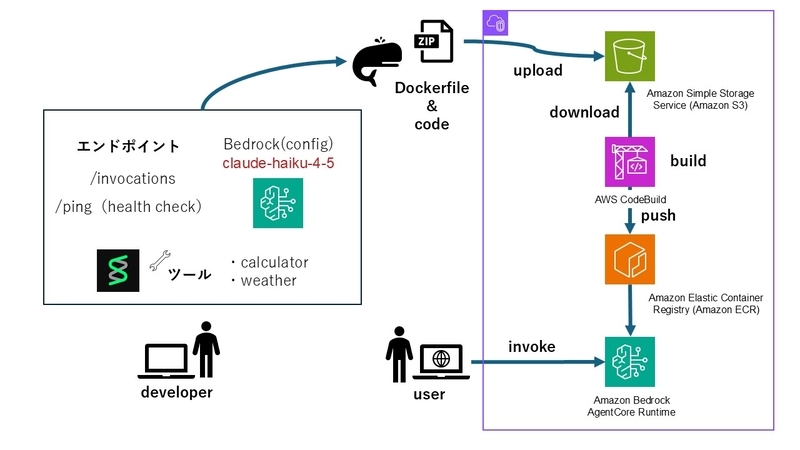
今回の手順では、以下のようなフローでエンドポイントがホストされます
- zip化したコードとDockerfileをS3にアップロードする
- CodeBuildがS3からダウンロードしビルドを実行、ECRへプッシュする
- RuntimeAgentがこのイメージを利用して、エンドポイントを公開
※この手順ではエンドポイントの呼び出しにAWSの認証情報を使用
Terraformコード化する
実際の運用では、デプロイフローをIaCで管理することになるでしょう。
bedrock_agentcore_starter_toolkitで自動作成できる良さはありますが、使用するコンポーネントをTerraformする試みを実施します。
Terraformコード化
どのような設定でリソースが作成されるかを知りたいので、観測可能な範囲で(※本当はCloudTrailでトレースするべきではありますが...)importを実行します。
この際にimport時の自動生成機能を用いてtfファイルを記述します。
import
以下のように記述してimportをします。
ロールだけはCreateRoleでフィルターし、作業時間からCloudTrailで特定しました。
import {
  id = "AmazonBedrockAgentCoreSDKCodeBuild-ap-northeast-1-mask"
  to = aws_iam_role.example_role_codebuild
}

import {
  id = "AmazonBedrockAgentCoreSDKRuntime-ap-northeast-1-mask"
  to = aws_iam_role.example_role_runtime
}

import {
  id = "bedrock-agentcore-runtime-415467724776-ap-northeast-1-7pd9unr6i"
  to = aws_s3_bucket.example
}

import {
  id = "bedrock-agentcore-strands_claude_getting_started"
  to = aws_ecr_repository.example
}

import {
  id = "bedrock-agentcore-strands_claude_getting_started-builder"
  to = aws_codebuild_project.example
}

import {
  id = "strands_claude_getting_started-mask"
  to = awscc_bedrockagentcore_runtime.example
}
💡AgentCore Runtime import の id に何を指定するの?
AgentCore RuntimeのIDとは個別のランタイムをひらいた際に表示される「ランタイム ID」のことでした。
自動生成結果
自動生成の結果は以下のようになりました。
サフィックスやアカウント番号はマスクしています。
# __generated__ by Terraform
# Please review these resources and move them into your main configuration files.

# __generated__ by Terraform
resource "aws_codebuild_project" "example" {
  badge_enabled          = false
  build_timeout          = 60
  concurrent_build_limit = 1
  description            = null
  encryption_key         = "arn:aws:kms:ap-northeast-1:mask:alias/aws/s3"
  name                   = "bedrock-agentcore-strands_claude_getting_started-builder"
  project_visibility     = "PRIVATE"
  queued_timeout         = 480
  resource_access_role   = null
  service_role           = "arn:aws:iam::mask:role/AmazonBedrockAgentCoreSDKCodeBuild-ap-northeast-1-mask"
  source_version         = null
  tags                   = {}
  tags_all               = {}
  artifacts {
    artifact_identifier    = null
    bucket_owner_access    = null
    encryption_disabled    = false
    location               = null
    name                   = null
    namespace_type         = null
    override_artifact_name = false
    packaging              = null
    path                   = null
    type                   = "NO_ARTIFACTS"
  }
  cache {
    location = null
    modes    = []
    type     = "NO_CACHE"
  }
  environment {
    certificate                 = null
    compute_type                = "BUILD_GENERAL1_MEDIUM"
    image                       = "aws/codebuild/amazonlinux2-aarch64-standard:3.0"
    image_pull_credentials_type = "CODEBUILD"
    privileged_mode             = true
    type                        = "ARM_CONTAINER"
  }
  source {
    buildspec           = "\nversion: 0.2\nphases:\n  build:\n    commands:\n      - echo \"Starting parallel Docker build and ECR authentication...\"\n      - |\n        docker build -t bedrock-agentcore-arm64 . &\n        BUILD_PID=$!\n        aws ecr get-login-password --region $AWS_DEFAULT_REGION | \\\n        docker login --username AWS --password-stdin mask.dkr.ecr.ap-northeast-1.amazonaws.com/bedrock-agentcore-strands_claude_getting_started &\n        AUTH_PID=$!\n        echo \"Waiting for Docker build to complete...\"\n        wait $BUILD_PID\n        if [ $? -ne 0 ]; then\n          echo \"Docker build failed\"\n          exit 1\n        fi\n        echo \"Waiting for ECR authentication to complete...\"\n        wait $AUTH_PID\n        if [ $? -ne 0 ]; then\n          echo \"ECR authentication failed\"\n          exit 1\n        fi\n        echo \"Both build and auth completed successfully\"\n      - echo \"Tagging image with version 20260219-074315-241...\"\n      - \"docker tag bedrock-agentcore-arm64:latest mask.dkr.ecr.ap-northeast-1.amazonaws.com/bedrock-agentcore-strands_claude_getting_started:20260219-074315-241\"\n  post_build:\n    commands:\n      - echo \"Pushing versioned image to ECR...\"\n      - \"docker push mask.dkr.ecr.ap-northeast-1.amazonaws.com/bedrock-agentcore-strands_claude_getting_started:20260219-074315-241\"\n      - echo \"Build completed at $(date)\"\n"
    git_clone_depth     = 0
    insecure_ssl        = false
    location            = "bedrock-agentcore-codebuild-sources-mask-ap-northeast-1/strands_claude_getting_started/source.zip"
    report_build_status = false
    type                = "S3"
  }
}

# __generated__ by Terraform from "bedrock-agentcore-strands_claude_getting_started"
resource "aws_ecr_repository" "example" {
  force_delete         = null
  image_tag_mutability = "MUTABLE"
  name                 = "bedrock-agentcore-strands_claude_getting_started"
  tags                 = {}
  tags_all             = {}
  encryption_configuration {
    encryption_type = "AES256"
    kms_key         = null
  }
  image_scanning_configuration {
    scan_on_push = false
  }
}

# __generated__ by Terraform from "bedrock-agentcore-runtime-mask-ap-northeast-1-7pd9unr6i"
resource "aws_s3_bucket" "example" {
  bucket              = "bedrock-agentcore-runtime-mask-ap-northeast-1-7pd9unr6i"
  bucket_prefix       = null
  force_destroy       = null
  object_lock_enabled = false
  tags                = {}
  tags_all            = {}
}

# __generated__ by Terraform from "strands_claude_getting_started-mask"
resource "awscc_bedrockagentcore_runtime" "example" {
  agent_runtime_artifact = {
    code_configuration = null
    container_configuration = {
      container_uri = "mask.dkr.ecr.ap-northeast-1.amazonaws.com/bedrock-agentcore-strands_claude_getting_started:20260219-074315-241"
    }
  }
  agent_runtime_name       = "strands_claude_getting_started"
  authorizer_configuration = null
  description              = null
  environment_variables    = {}
  lifecycle_configuration = {
    idle_runtime_session_timeout = 900
    max_lifetime                 = 28800
  }
  network_configuration = {
    network_mode        = "PUBLIC"
    network_mode_config = null
  }
  protocol_configuration       = "HTTP"
  request_header_configuration = null
  role_arn                     = "arn:aws:iam::mask:role/AmazonBedrockAgentCoreSDKRuntime-ap-northeast-1-mask"
  tags                         = {}
}

# __generated__ by Terraform from "AmazonBedrockAgentCoreSDKCodeBuild-ap-northeast-1-mask"
resource "aws_iam_role" "example_role_codebuild" {
  assume_role_policy = jsonencode({
    Statement = [{
      Action = "sts:AssumeRole"
      Condition = {
        StringEquals = {
          "aws:SourceAccount" = "mask"
        }
      }
      Effect = "Allow"
      Principal = {
        Service = "codebuild.amazonaws.com"
      }
    }]
    Version = "2012-10-17"
  })
  description           = "CodeBuild execution role for Bedrock AgentCore ARM64 builds"
  force_detach_policies = false
  max_session_duration  = 3600
  name                  = "AmazonBedrockAgentCoreSDKCodeBuild-ap-northeast-1-mask"
  name_prefix           = null
  path                  = "/"
  permissions_boundary  = null
  tags                  = {}
  tags_all              = {}
}

# __generated__ by Terraform from "AmazonBedrockAgentCoreSDKRuntime-ap-northeast-1-mask"
resource "aws_iam_role" "example_role_runtime" {
  assume_role_policy = jsonencode({
    Statement = [{
      Action = "sts:AssumeRole"
      Condition = {
        ArnLike = {
          "aws:SourceArn" = "arn:aws:bedrock-agentcore:ap-northeast-1:mask:*"
        }
        StringEquals = {
          "aws:SourceAccount" = "mask"
        }
      }
      Effect = "Allow"
      Principal = {
        Service = "bedrock-agentcore.amazonaws.com"
      }
      Sid = "AssumeRolePolicy"
    }]
    Version = "2012-10-17"
  })
  description           = "Execution role for BedrockAgentCore Runtime - strands_claude_getting_started"
  force_detach_policies = false
  max_session_duration  = 3600
  name                  = "AmazonBedrockAgentCoreSDKRuntime-ap-northeast-1-mask"
  name_prefix           = null
  path                  = "/"
  permissions_boundary  = null
  tags                  = {}
  tags_all              = {}
}
💡importの不具合
`aws_codebuild_project`の`concurrent_build_limit = 1`はなぜかインポートした際に0になってました。
1に変更してplan後に差分がなかったのでこれが正ですが、生成ができなかった理由は追及してません。
Terraform化したことで、AgentCore周辺の基本的な構成がはっきりしてきました。
感想
記事が長くなったので一旦ここで切ります。
構成図を眺めてTerraform化してみるとAWSの一般的なCI/CDパイプラインの部分は理解できますが、AgentをホストするRuntimeがどのような機能を担うのかよくわかりません。
この詳細を追うのがAgentCoreプラットフォームを理解する重要な観点になると考えました。
今は認証等を実装しつつあるので、今後はその記事を出せればと思っています。
執筆:@sato.yu
レビュー:Ishizawa Kento (@kent)
(Shodoで執筆されました)





